Freeflow Combat System
Melee combat inspired by the Batman: Arkham games, built solo in Unreal Engine 5 with C++.
Overview
In the Arkham games you fight a whole crowd with one attack button and one counter button, and it still plays out like a choreographed fight scene. I wanted to understand how that works, so I rebuilt the core of the system myself.
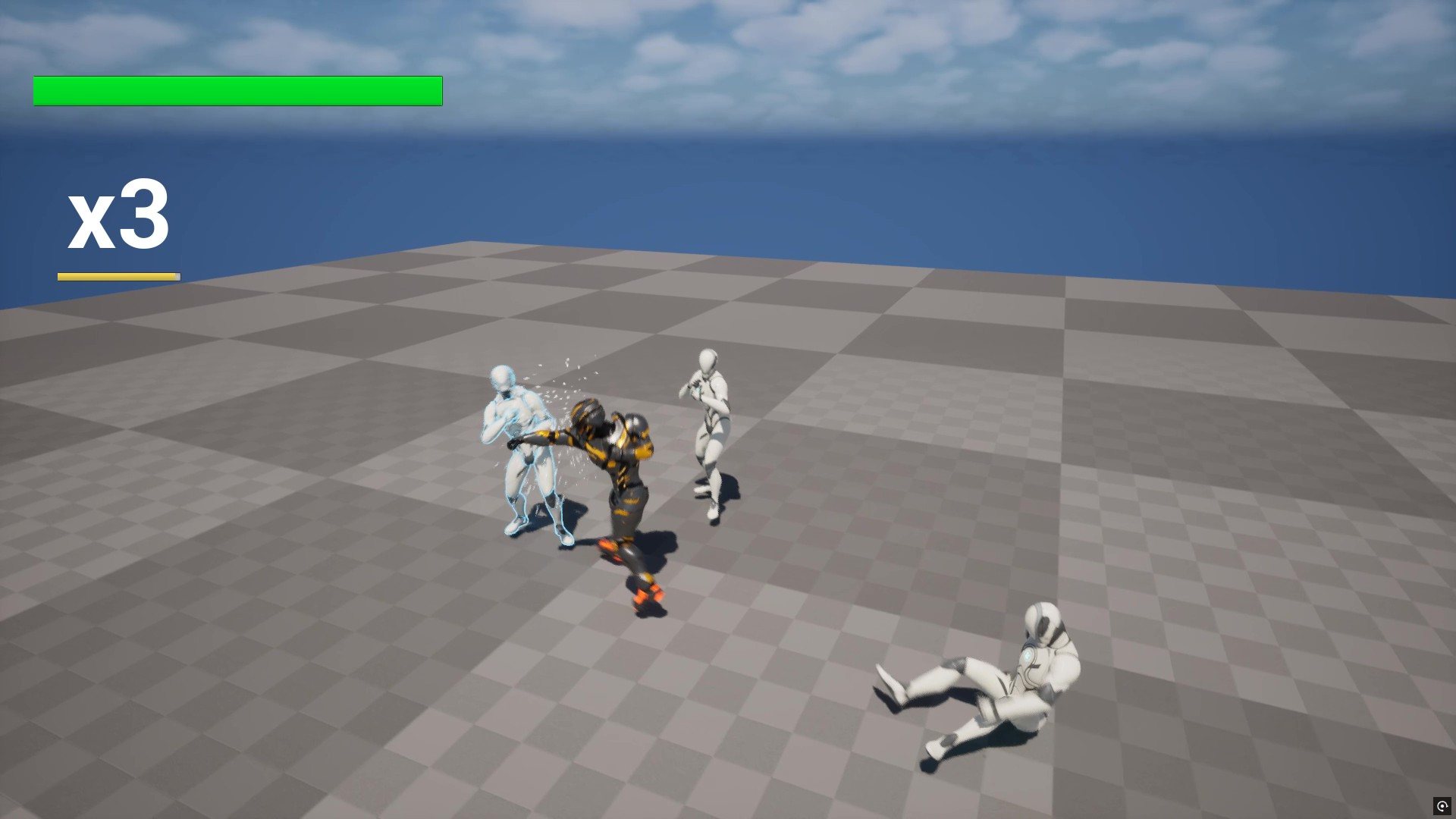
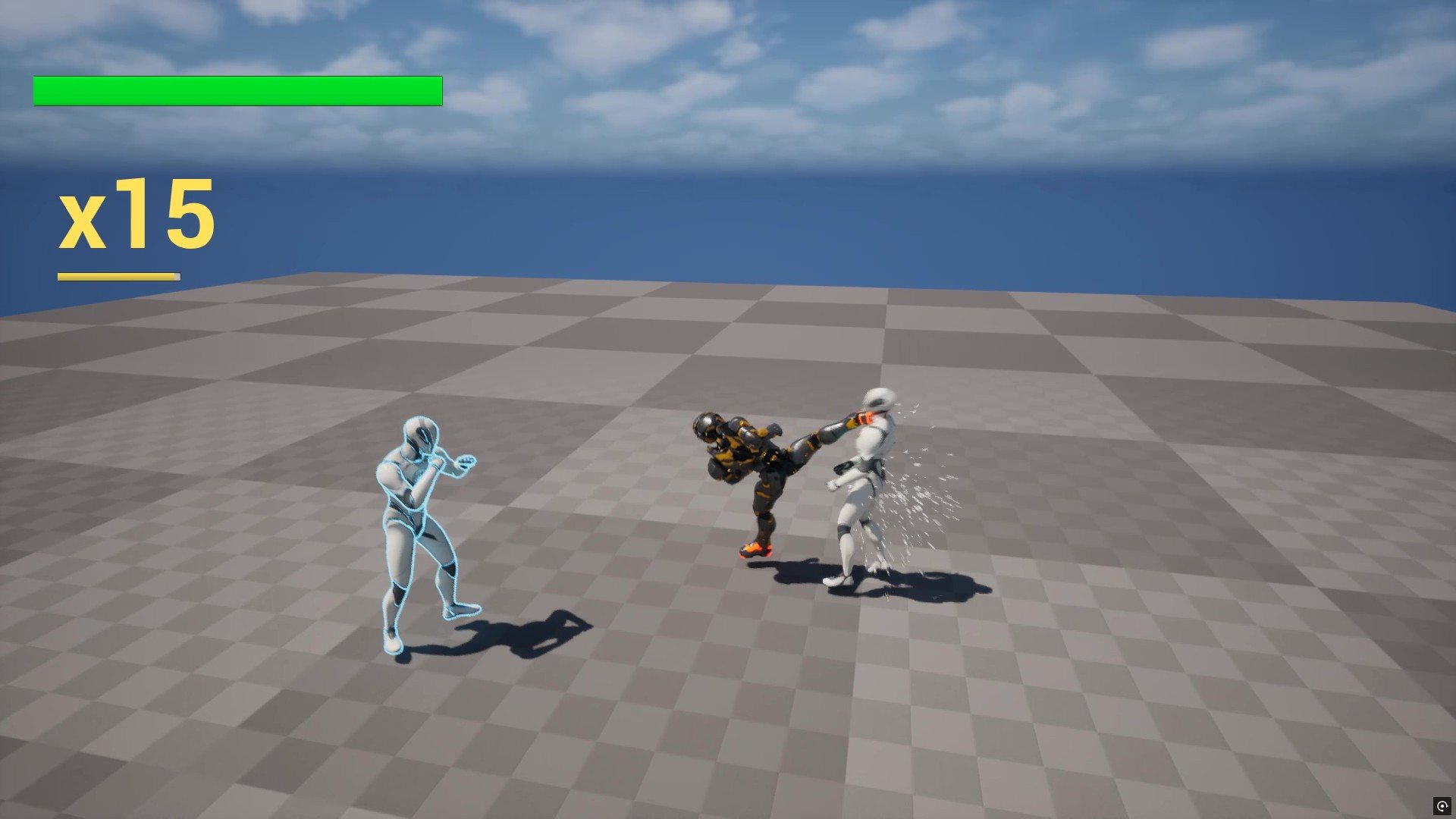
The demo puts you in an arena against a crowd that keeps refilling. You chain hits from enemy to enemy, counter punches as they're telegraphed and build up a combo, until the last enemy goes down in slow motion.
All gameplay logic is written in C++. Animations, effects and tuning live in the editor as data, so attacks and combos can be added or changed without touching code. The code and systems are my own work; the animations, character model and music are third-party assets (see credits).
What I built
- Target selection: picks the enemy in the direction of the stick or mouse, falling back to the current target or whoever is in front of you. The enemy your next attack will hit gets an outline.
- Moving to the target: big travelling moves use motion warping, short ones a code-driven slide. Both are timed so the hit lands exactly on the animation's contact frame.
- Combos that flow: hits cut from the same animation play straight into each other instead of restarting and blending, and a rare special combo plays out in full from a single press.
- Data-driven attacks: each attack is a data asset (animation, damage, knockdown chance, hit-stop, camera shake, impact sound). A combo is an ordered list of them, and flashy kicks open a switch to a new target or finish off an enemy.
- Counters: picks the enemy whose punch lands first and lines both characters up for a paired animation. The player is invulnerable during the move.
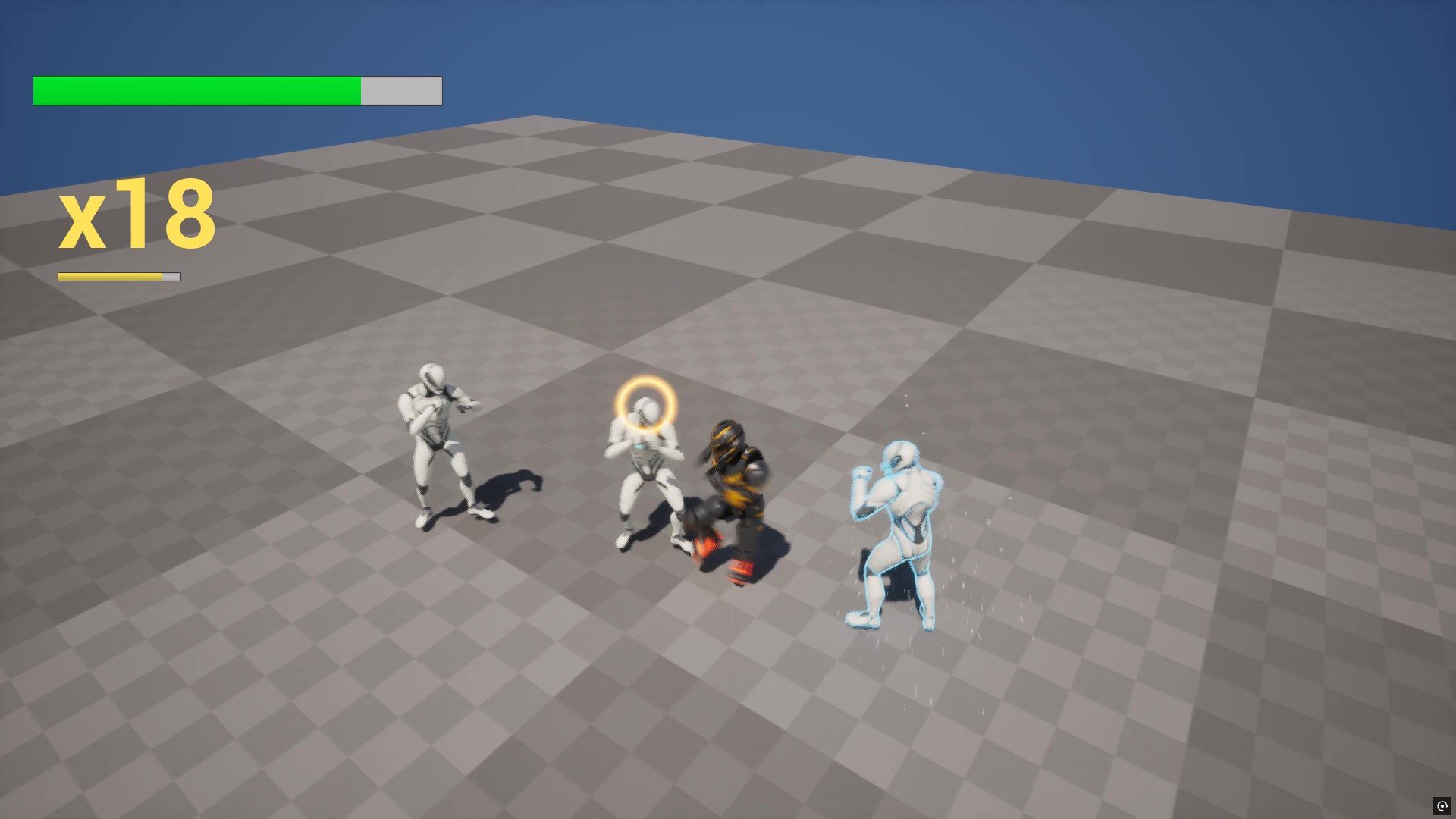
- Enemy AI: enemies take positions around the player and attack in turns, paced by how many are alive. Each attack is telegraphed with a warning ring that flashes faster as the punch gets closer.
- Game feel: hit-stop, camera shake, hit effects, layered and randomised impact sounds, directional hit reactions, a combat camera that frames the crowd, and slow motion with a camera push-in on the final blow.
- HUD and encounter: health bar with a draining trail, a combo counter that "thumps" on every hit, and a spawner that keeps the crowd topped up and ends the demo.
Technical breakdown
Architecture
- The player's combat is a single
UActorComponent(UCombatComponent) driven by two enums: anECombatState(Idle, Attacking, Countering, Staggered) and, per attack, anEAttackPhase(Windup, Active, Recovery). Input during Windup and Active is buffered and fires as the hit window closes. - Enemy coordination lives in a
UEnemyManagerComponenton the GameMode, so no enemy decides on its own when to attack. - Attacks are
UPrimaryDataAssets; Blueprints only subclass the C++ classes to assign assets throughUPROPERTY(EditDefaultsOnly). There are no hard-coded asset paths in C++. - Gameplay talks to the UI and game mode through dynamic multicast delegates (
OnHealthChanged,OnComboChanged,OnFinalBlow,OnEncounterComplete), so the HUD has no dependency the other way. Cross-actor references like the current target areTWeakObjectPtrs.
Procedural strike analysis
Instead of hand-placed anim notifies, every attack is analysed once at BeginPlay. For each montage
section the analysis resolves the FAnimSegment playing at each time to its UAnimSequence
and local time, then samples local bone transforms at 60 Hz through GetBoneTransform with an
FAnimExtractContext.
For each candidate limb (both hands and both feet) it builds the component-space position by walking the parent chain, skipping the root bone so root motion doesn't count as reach, and projects it on the forward axis. From that curve it takes the peak extension and the deepest wind-up before it. The contact frame is where the limb first crosses 85% of that range: the moment the fist arrives, not the middle of it being held out.
// Simplified from StrikeAnalysis.cpp
// Walk the chain parent-first (root skipped) to get component space
FTransform Pose = FTransform::Identity;
for (const int32 Bone : Limb.Chain)
{
    Pose = SampleBone(Sequence, Bone, AnimTime) * Pose;
}
const float Extension = FVector::DotProduct(Pose.GetLocation(), Forward);

// Contact = the limb arriving, not the middle of it being held out
const float Threshold = Rest + ContactExtension * (Peak - Rest);
The striking limb is the one with the highest peak + 0.5 × (peak − wind-up). Reach alone
picks the planted hand in a flip, movement alone picks the stepping foot in a punch, and the weighting gets every
attack in the project right. The result also gives the reach (how far from the target to stand) and the root travel
before contact, which decides whether the attack is motion-warped. Results are cached in a
TMap<TPair<const UAnimMontage*, FName>, FStrikeInfo>, and the enemies use the same analysis
for their own punches.
Motion warping from code
Attacks whose root travels 50 cm or more before contact keep their authored root motion and get bent onto the target at runtime. No Motion Warping notify states are placed in any montage: the component adds the root motion modifiers itself, over windows computed from the strike analysis, and re-aims the warp target every tick so it tracks a moving enemy.
// Simplified from CombatComponent.cpp
const float Start   = ActiveAttack.SectionStart;
const float Contact = Start + ActiveAttack.ContactTime;
const float End     = ActiveAttack.SectionEnd;

// Bend the authored root motion onto the target up to contact...
URootMotionModifier_SkewWarp::AddRootMotionModifierSkewWarp(
    MotionWarping, Montage, Start, Contact, WarpTargetName,
    EWarpPointAnimProvider::None, FTransform::Identity, NAME_None);

// ...then damp it so the follow-through doesn't carry into the enemy
const FVector Damp(PostContactScale, PostContactScale, 1.f);
URootMotionModifier_Scale::AddRootMotionModifierScale(
    MotionWarping, Montage, Contact, End, Damp);
The modifiers are kept as TWeakObjectPtrs and marked for removal when the next attack starts, because
chained attacks reuse the same montage and stale windows would otherwise still apply. Short attacks use a kinematic
slide instead: each tick moves the player remaining distance × (dt / time to contact), clamped to a
maximum speed, so it arrives at strike distance exactly on the contact frame.
Hit detection
- While the hit window is open, a sphere is swept with
SweepMultiByObjectTypefrom last frame's socket position to this frame's, so fast kicks can't tunnel through a target between frames. Hands and feet get different radii. - Hit actors are de-duplicated per attack, and attacks flagged as target-only (knockdown kicks) never clip bystanders.
- If the sweep somehow misses the committed target, it still takes the hit when the window closes, as long as it's in reach and in front of the player. Freeflow never whiffs.
Montage section flow
- Multi-hit combos are one montage with a section per hit. When the next attack is the next section and both sides of the boundary fall in the same
FAnimSegment(checked withFAnimTrack::GetSegmentIndexAtTime), the component callsMontage_SetNextSectionand keeps the running instance instead of callingMontage_Playagain. - The
FAnimMontageInstanceID is bound into theFOnMontageEndeddelegate, so end callbacks from an instance that is still blending out can't end the attack that replaced it.
Time: hit-stop and slow motion
- Hit-stop sets
CustomTimeDilationto 0 on only the attacker and the victim, so the rest of the crowd keeps moving. One shared timer restores everyone, so overlapping hits can't strand a victim frozen. - The final blow uses global time dilation instead, with its timer scaled by the dilation to get real seconds, plus a camera push-in through the player's
OnFinalBlowdelegate.
Enemy coordination
- Attacker slots scale with the crowd:
ceil(engaged enemies / EnemiesPerAttacker), clamped to a maximum. The attack clock pauses while all slots are taken, so attacks don't queue up back to back. - The interval between attacks is lerped from a patient solo range to an aggressive crowd range based on fight size. Whoever the player is currently hitting is excluded, so someone else takes the shot.
- Enemies hold slots on a ring around the player, each assigned the nearest free slot, plus a separation force, moving through
AAIController::MoveToLocationon the nav mesh. - Enemy punches that would land too quickly are slowed down (to at most half speed) so the player always gets a 0.8 s counter window. The warning ring is a
UMaterialInstanceDynamicwhose urgency parameter runs from telegraph to contact.
Counters
- The counter picks the counterable enemy in range with the lowest time to contact, so it always answers the punch that would land first.
- The paired animation needs both characters exactly where the animator placed them. The enemy is rotated to face the player, and the player is placed at an offset measured from the two animations' contact poses.
- Both characters call
MoveIgnoreActorAddon each other for the duration, so their capsules don't block each other's root motion.
Runtime retargeting
The visible trooper model isn't on the mannequin skeleton. Instead of converting every animation, each character
keeps a hidden mannequin USkeletalMeshComponent that runs the full animation graph, and a visible
VisualMesh that copies its pose through an IK Retargeter (Retarget Pose From Mesh). The hidden mesh
uses AlwaysTickPoseAndRefreshBones so it keeps evaluating while invisible, and
AddTickPrerequisiteComponent makes the visible mesh tick after it, so the copy is never a frame behind.
Sockets, sweeps and root motion all stay on the mannequin.
Spawner and HUD
- The spawner prefers spawn points that are free, far from the player and outside the camera's view (a dot product against the FOV cone with a margin), projects them onto the nav mesh and spawns with
AdjustIfPossibleButDontSpawnIfColliding. - The HUD is a C++
UUserWidgetsubclass usingBindWidget/BindWidgetOptional. The layout lives in UMG, and the combo "thump" is an ease-out render-scale animation inNativeTick.
Problems I solved
Combo hits landing mid-blend
At first every hit restarted the montage at its section with Montage_Play, and the 0.25 s blend-in
meant each punch's contact frame landed mid-blend, so combos looked stiff. Linking the sections and reusing the
running montage instance (see Montage section flow) made a combo play exactly as it was animated.
Misaligned counters
The counter placed the player at a fixed 95 cm from the enemy, but the paired animations meet at about 76 cm with a small sideways offset, and the two capsules pushed each other apart during the root motion. Measuring the offset from the contact poses and ignoring each other's movement collision for the duration fixed both.
Broken fingers after retargeting
Retargeting the UE4 animations to the UE5 mannequin left open palms and bent fingers. The IK Retargeter had duplicated ops in its stack, and the UE5 metacarpal chains were mapped onto the UE4 finger chains. Clearing the duplicates and leaving the metacarpals unmapped fixed the hands, and the affected animations were re-exported.
Code structure
UCombatComponent: the player's fight state machine: targeting, combos, warping, hit detection, counters, hit-stopStrikeAnalysis: contact frame, striking limb, reach and root travel from bone dataAEnemyCharacter: telegraphed attacks, hit reactions, knockback, being counteredUEnemyManagerComponent: surround slots, attacker slots and attack pacingUAttackData: the data asset that describes one attackAEnemySpawner: spawn point selection, crowd growth, end of the encounterAArkhamCharacterBase: health, damage, death and the runtime-retargeted visual meshUPlayerHUDWidget: health bar and combo counter logic, with the look in UMG
Credits
I wrote all of the code and built the systems, Blueprints, data assets, montages, retargeting setup and UI. These assets are not my work:
- Animations: the H2H animation set [source] and RamsterZ Free Anims (Fab). I retargeted them to the UE5 mannequin and cut and tuned the montages; the motion itself is theirs.
- Character model: Sci-Fi Trooper Man 03 (Fab), used for both the player and the enemies.
- Music: "Machine Language" by NLI.
- Impact sounds: Kenney Impact Sounds (CC0), layered into randomised Sound Cues.
- Base content: the UE5 mannequin, hit effect, camera shakes and arena level from Epic Games' Third Person template.